Private networks and VPNFree with internet
Sites, the LANs behind them and people's laptops, together and private. No VPN box at any site, and no NNI.
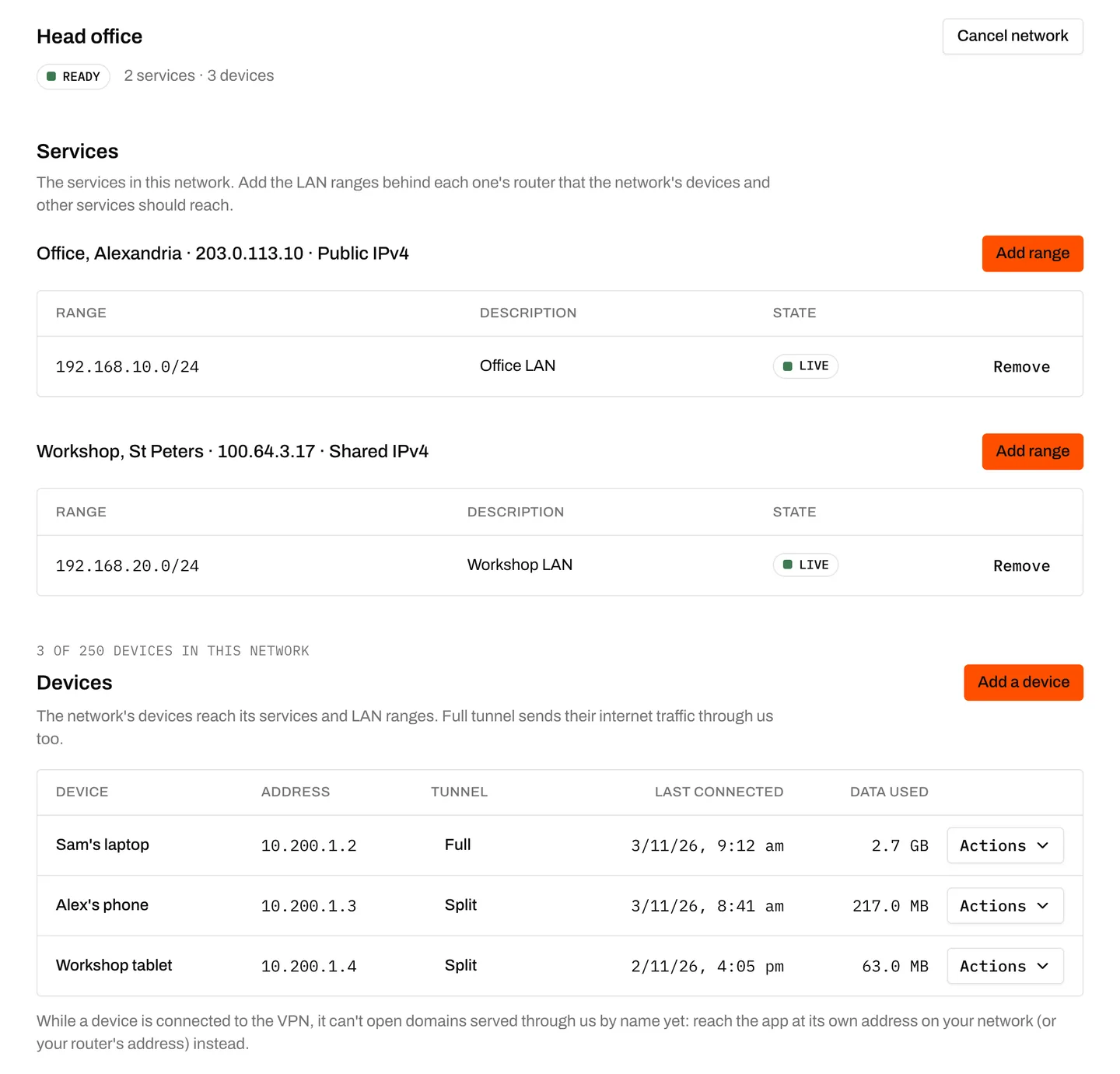
Order it, then move lines in
A network is a service you order in the portal or API, at no charge. Move your Layer 3 nbn services in: home or business, shared or public IPv4. Nothing joins on its own, and every move shows what changes first.
WireGuard, run on our edges
Add a device, scan the code, and it's on. The VPN runs in our network, so no router at any site has to run one. Invite someone and they set up their own device from a single-use link.
LANs routed, not NATed
Declare the ranges behind each site, and every site and device in the network reaches them. Your ranges can overlap other customers' and your other networks'; inside one network, each range must be its own.
At a glance
Site-to-site and remote access without a VPN box: join nbn sites, the LANs behind them and WireGuard devices in a private network. Ordered in the portal or API.
- Price
- Free with an active internet service
- Who can join
- Your Layer 3 nbn services on our addresses: home or business, shared or public IPv4. Layer 2 and L3VPN services, and services on your own range (BYOIP), can't join
- Networks
- Up to 10 per customer to start, raised on request; each isolated: networks never route to each other
- LAN ranges
- IPv4, up to 16 per service; routed into the network, not NATed
- VPN
- WireGuard. A device's setup is shown once; through the API, its private key can stay on the device
- Devices
- In one network, or basic: up to 5 per customer, reaching the customer's own services outside any network
- Invites
- Single use, valid for 7 days, under the brand the customer deals with
- Internet from devices
- Out through our Sydney edges with a fixed block of ports per device; devices in a network can split-tunnel instead
- Edges
- Two, in Sydney
- Moving a service
- A preview first, then the service reconnects. Most routers are back within a minute; some take up to half an hour
- Where
- Business portal, Business API and your white-label portal
- Encryption
- Devices encrypt to our edge with WireGuard. Between sites, IPv4 crosses nbn and our network inside the private network, without added encryption; IPv6 between sites travels as ordinary internet traffic
- Not included
- VPNs or IPsec on your routers; routing between networks; IPv6 inside a network, including IPv6 LAN ranges
Who it's for
- Businesses joining offices, a warehouse and staff laptops
- MSPs giving each client a network of its own
- Resellers whose customers want to reach home, even on shared IPv4
- Households reaching the NAS, cameras or Home Assistant from a phone, through their provider
- Anyone who wants their router's admin page on their phone without opening it to the internet
How it fits together
Sites join over their own nbn service. Devices join over WireGuard, through our edges in Sydney. Nothing joins until you move it in.
Your sites
nbn services and their LANs
Underlay
Your private network
Devices
Laptops and phones
Two kinds of device
Every device runs WireGuard. What it reaches depends on where you put it.
Basic
No network · up to 5 per customer
Reaches your own services that aren't in a network, including a router's address on shared IPv4, and the internet through our edges. No network to order first.
In a network
One network each
Reaches every site and LAN range in its network. Add it yourself, or send a single-use invite and the person sets up their own device.
Who does what
What you set up, and what we run.
You
- On each site's router, route the network's VPN range to your LAN without NAT, and allow it in from the internet side
- Keep NATing your LAN to the internet as usual
- Your firewall rules: we route the traffic, and your router decides what it lets in
Underlay
- Run the VPN, the routing between your sites and the edges
- Make every change our routers need for your network: checked, committed with an automatic rollback, and logged
- Keep each network isolated from every other
- Keep a record of which device used which public address and ports
Buying for your own business? We support your authorised contacts directly under our Business Terms.
If you resell this service
You manage your customer relationship, billing and frontline support, including the disclosures and consumer protections that apply to your offer. We support your authorised contacts under our Wholesale Terms. We normally refer your customers back to you. Authorised contact and safety or legal exceptions may apply. We do not use wholesale customer details to market to them, including for NYX Internet.
- Your customers order networks and add devices in your white-label portal, under your brand
- Device invites open on your portal's address, with your name, logo and support details
- Set your own VPN hostname, such as syd.vpn.yourbrand.com.au, and every device config shows it
Questions
What does it cost?
Nothing, for any customer with an active internet service. If you resell, you decide whether to charge your customers for it.
Does a business service have to be in a network?
No. A business service is nbn with a public IPv4 included. Networks are separate: a service joins one only when you move it in, and it keeps its own address and internet either way.
What does each site's router need?
It routes the network's VPN range to its LAN without NATing it, and lets that range in from the internet side. Everything else stays as it is, including NAT for its own internet. Every network shows the full checklist in the portal.
Can a device reach a line on shared IPv4?
Yes. A basic device, in no network, reaches its owner's own services that aren't in a network, including a router's address on shared IPv4, with nothing opened to the internet. A device in a network reaches every site and LAN range in it.
Does internet traffic go through the VPN?
A device in a network can send everything through our Sydney edges (full tunnel) or only what's for the network (split tunnel). A basic device always sends everything through our edges. Internet traffic leaves from our edges' own public addresses, with a fixed block of ports per device that we keep on record.
Can a data centre, a fibre site or our own core join a network?
Talk to us. Joining a site on designed private connectivity (Layer 2 or L3VPN to your NNI or rack) into a private network is engineering work we scope with you, not a portal option. Tell us about the site.
Often used with
- nbn connectivitynbn across access technologies, subject to address and product qualification; delivered at Layer 2 or terminated by us at Layer 3.
- Domains and HTTPSFree with internetPut a web app that runs behind a router on your own domain, served over HTTPS through our edges, even on a line with no public IP.
- Private connectivityLayer 2 and L3VPN from your sites to your own racks and core, designed for your topology and quoted. To join sites and devices to each other, order a private network instead: free with internet.