Domains and HTTPSFree with internet
Your domain, over HTTPS, to something behind a router. With or without a public IP.
Works on shared IPv4
Visitors reach our edges, and we carry each request across our own network to the line. A service with no public IP of its own can still serve a site.
Certificates handled
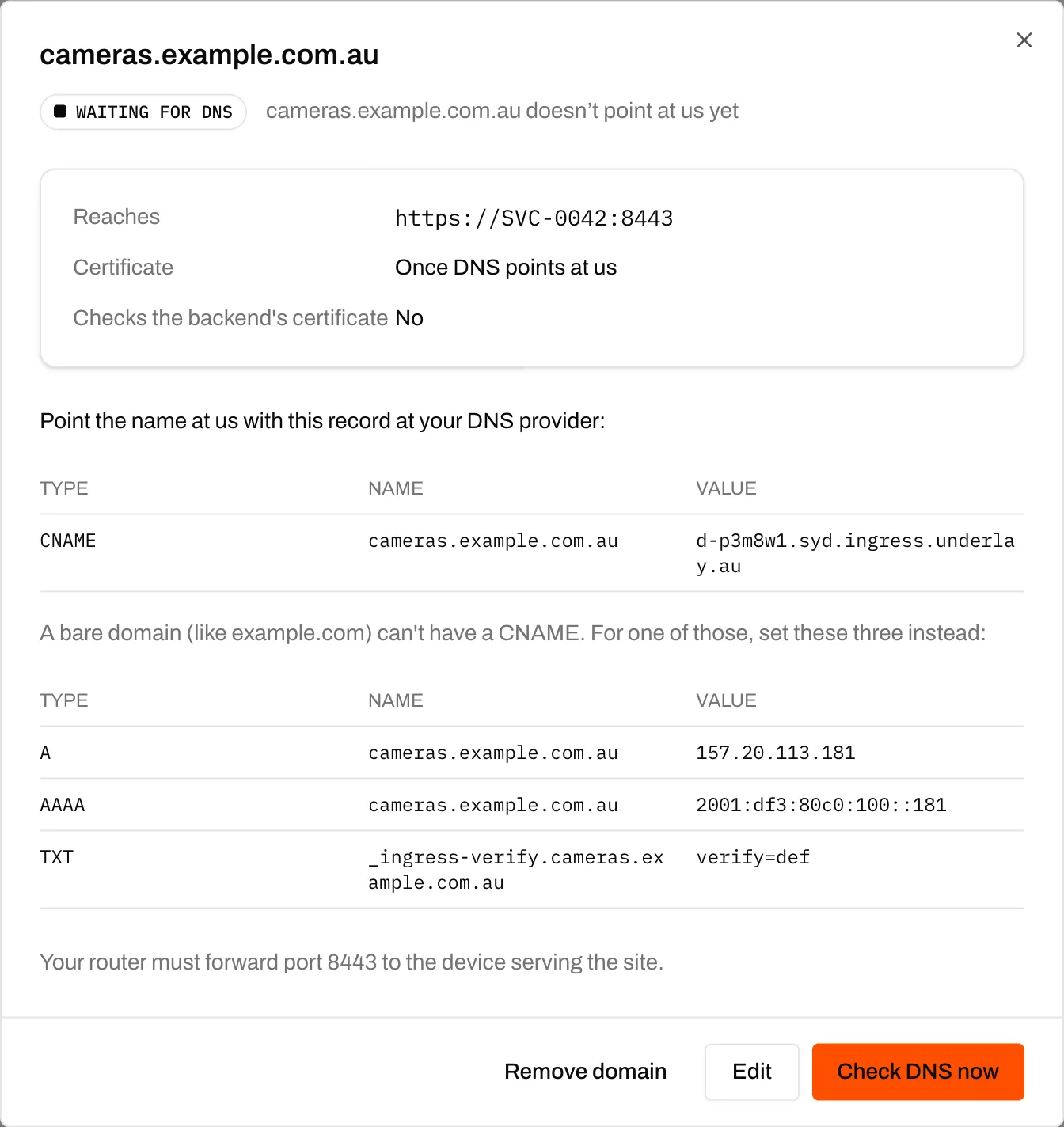
Once DNS points at us, we issue the certificate, renew it and serve it from every edge. HTTP redirects to HTTPS.
Point it, change it later
CNAME to the domain's own target, or set A, AAAA and TXT records at an apex. Change where it goes later, in place, and keep the certificate.
At a glance
Put a web app that runs behind a router on your own domain, served over HTTPS through our edges, even on a line with no public IP.
- Price
- Free with an active internet service
- Domains
- Up to 20 per customer
- Backends
- A Layer 3 nbn service on our addresses and a port, through a port-forward on its router; or an address in a private network's LAN range and a port
- To the backend
- HTTP or HTTPS; a self-signed certificate on the backend is fine
- DNS
- A CNAME to the domain's own target, or A, AAAA and TXT records at an apex
- Certificates
- Let's Encrypt, issued and renewed by us, served by every edge
- Headers
- X-Forwarded-For and X-Forwarded-Proto
- Edges
- Two, in Sydney
- Protocols
- HTTP and HTTPS only. No raw TCP or UDP, wildcard domains or TLS passthrough
- Where
- Business portal, Business API and your white-label portal
- Good to know
- A device connected to our VPN reaches the app at its own address on your network, or your router's address, not by name, for now
Who it's for
- Customers on shared IPv4 who run a website or app at home or in the office
- MSPs publishing a client's booking system, NAS or camera recorder
- Resellers whose customers want to host without buying an IPv4 address
How a request gets there
Your domain points at our edges. We answer over HTTPS and carry the request across our own network to the line, so it works with no public IP.
Visitor
Your domain
Underlay
Edges in Sydney
Your line
A service or a LAN address
Who does what
What you set up, and what we run.
You
- Point DNS at us: a CNAME, or A, AAAA and TXT records at an apex
- For a service backend, forward the port on its router to the app
- For a LAN backend, allow 100.127.255.0/28 in and route replies to it rather than NATing them
- What you serve: our Acceptable Use Policy applies
Underlay
- Run the edges and carry each request across our network to the line
- Issue, renew and serve every certificate
- Answer unknown hostnames with a plain 404, never someone else's site
Buying for your own business? We support your authorised contacts directly under our Business Terms.
If you resell this service
You manage your customer relationship, billing and frontline support, including the disclosures and consumer protections that apply to your offer. We support your authorised contacts under our Wholesale Terms. We normally refer your customers back to you. Authorised contact and safety or legal exceptions may apply. We do not use wholesale customer details to market to them, including for NYX Internet.
- Your customers add domains in your white-label portal, under your brand
- Set your own domain target, such as *.syd.edge.yourbrand.com.au, and every DNS instruction shows it
Questions
What does it cost?
Nothing, for any customer with an active internet service, up to 20 domains each. If you resell, you decide whether to charge your customers for it.
Do we need a public IPv4?
No. The domain points at our edges, and we carry the request across our network to the line, on shared IPv4 or a public address. A public IPv4 is still the answer for anything that isn't a website, like a game or mail server.
Can it point at something on a LAN?
Yes: an address inside one of a private network's LAN ranges, and a port. The router lets 100.127.255.0/28 in and routes replies back to it rather than NATing them. Without a network, point the domain at the service and forward the port on its router.
What about raw TCP, UDP or wildcard domains?
Domains are HTTP and HTTPS only, one hostname each, and we terminate TLS at our edges. There's no raw TCP or UDP, wildcard or TLS passthrough.
Can a device on our VPN open the domain?
Not by name yet. While a device is connected to the VPN, it reaches the app at its own address on your network, or your router's address, instead.
Often used with
- nbn connectivitynbn across access technologies, subject to address and product qualification; delivered at Layer 2 or terminated by us at Layer 3.
- Private networks and VPNFree with internetSite-to-site and remote access without a VPN box: join nbn sites, the LANs behind them and WireGuard devices in a private network. Ordered in the portal or API.